


Overview
When generating PDFs with IronPDF that uses a Chrome-based rendering engine, developers may occasionally notice misalignment between the header/footer and the content —especially along the left and right page margins eventhough margin was set to 0 and UseMarginsOnHeaderAndFooter is used.
This issue often stems from a subtle but consistent behavior in Chrome’s default rendering.
What Causes the Misalignment?
By default, Chrome adds an 8-pixel margin to the <body> element of web pages. While this behavior is generally beneficial for standard web content, it can lead to unexpected layout shifts when generating PDFs—particularly in documents that require precise edge-to-edge alignment.
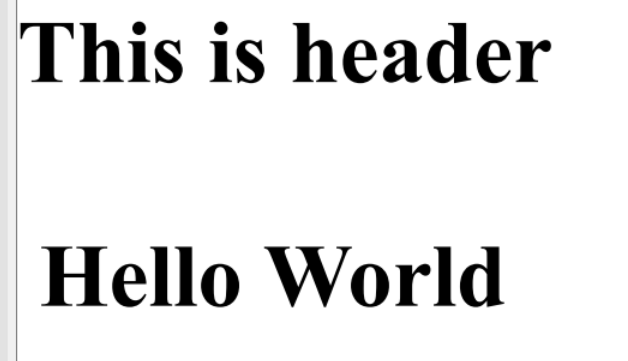
As a result, you may notice a visible 8-pixel gap between the content and the edges of the PDF page, even when MarginLeft = 0 has been explicitly set in ChromePdfRenderer.RenderingOptions.
It's important to note that this behavior does not apply to the header and footer sections. When margins are set to 0 in the renderer options, header and footer content aligns directly with the edge of the PDF page as expected, without the additional 8-pixel offset.
The code snippet below helps in demonstrate the issue
var renderer = new ChromePdfRenderer();

renderer.RenderingOptions.HtmlHeader = new HtmlHeaderFooter()
{
    HtmlFragment = "<h1>This is header</h1>"
};

renderer.RenderingOptions.MarginLeft = 0;
renderer.RenderingOptions.UseMarginsOnHeaderAndFooter = UseMargins.Left;

var pdf = renderer.RenderHtmlAsPdf("<h1>Hello World</h1>");
Output:
The Solution: Override Chrome’s Default Margin
To correct this misalignment, you can override the default body margins by applying the following CSS styles:
body {
margin-left: -8px;
margin-right: -8px;
}
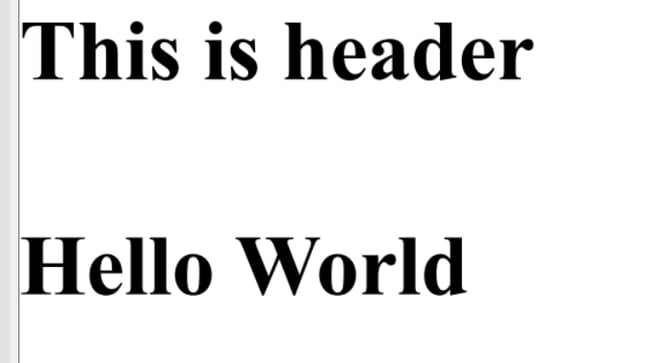
This negative margin effectively cancels out Chrome’s default 8px padding and ensures that your header, body content, and footer align properly across the full width of the page.
var renderer = new ChromePdfRenderer();

renderer.RenderingOptions.HtmlHeader = new HtmlHeaderFooter()
{
    HtmlFragment = "<h1> This is header </h1>"
};

renderer.RenderingOptions.MarginLeft = 0;
renderer.RenderingOptions.UseMarginsOnHeaderAndFooter = UseMargins.Left;

var pdf = renderer.RenderHtmlAsPdf("<h1 style=\"margin - left: -8px\">Hello World</h1>");
var renderer = new ChromePdfRenderer();

renderer.RenderingOptions.HtmlHeader = new HtmlHeaderFooter()
{
    HtmlFragment = "<h1>This is header</h1>"
};

renderer.RenderingOptions.MarginLeft = 0;
renderer.RenderingOptions.UseMarginsOnHeaderAndFooter = UseMargins.Left;

var pdf = renderer.RenderHtmlAsPdf("<h1 style=\"margin-left: -8;\">Hello World</h1>");  //adjust margin left to -8 px to cancel out default Chrome margin
Output:
-
This issue is primarily seen when rendering HTML to PDF using headless Chrome (e.g., IronPDF, Puppeteer, or Chrome DevTools Protocol).
-
You can also use a CSS reset or explicitly define
margin: 0on thebodyelement if you'd rather start from a clean slate.