


Overview
IronPDF users sometimes encounter issues when trying to programmatically add bookmarks based on text content within a PDF—especially when using the Pages.Lines property to find the index of a title. In certain PDFs, the text returned by Pages.Lines may appear garbled or unordered, preventing accurate searches.
This article outlines a practical workaround using ExtractTextFromPage() for developers who want to add bookmarks based on section headers even in PDFs where text layout is not straightforward.
The Problem with Pages.Lines
The Pages.Lines property attempts to reconstruct text based on how it visually appears on the page. However, this approach can lead to problems when:
-
Text is drawn in non-linear order
-
Custom fonts or encodings are used
-
The PDF has been generated from HTML or third-party tools with complex layouts
These issues can result in incomplete or mixed-up text, making it difficult to search for specific phrases or section headers reliably.
The Workaround: Use ExtractTextFromPage()
A more robust alternative is to use ExtractTextFromPage(), which extracts the raw embedded text from each page in logical reading order. This method improves search reliability and is better suited for locating specific text when generating bookmarks dynamically.
Sample Use Case: Bookmarking Sections by Header
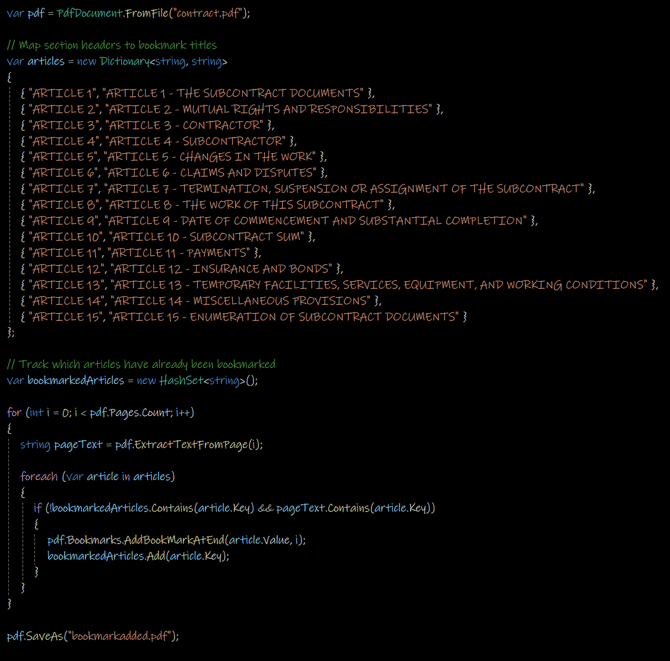
Let’s say you have a long, generated PDF containing multiple sections titled “ARTICLE 1”, “ARTICLE 2”, and so on, and you want to add bookmarks pointing to each of these sections.
Here’s how to do it using the ExtractTextFromPage() method:
Why This Works
-
ExtractTextFromPage()ensures more reliable access to plain text content across varying PDF structures. -
Looping through all pages ensures that you don’t miss any section, regardless of where it appears.
-
The
HashSetensures each article is bookmarked only once, avoiding duplicates.
Final Output
The resulting PDF will include a set of bookmarks for each of the specified article headings, even if the PDF was created from a dynamic HTML source or contains complex formatting.
Summary
If you're encountering issues with garbled or inconsistent results from Pages.Lines, switching to ExtractTextFromPage() is a reliable workaround. This method provides a cleaner, more consistent way to detect text and insert bookmarks programmatically.