


Environment
- OS: macOS
- Language/Runtime: Node.js (Express)
- Product: IronPDF (Node.js)
- Use case: QR code stamped into PDF, then rasterized to image
- Observed methods:
rasterizeToImageBuffers,rasterizeToImageFiles
Symptoms
- The QR code is black in the generated PDF (HTML → PDF looks correct).
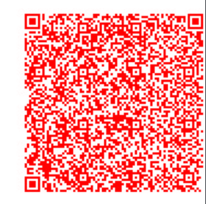
- The final PNG output is red when using:
await pdf.rasterizeToImageBuffers(...)await pdf.rasterizeToImageFiles(...)
- The red tint occurs consistently on every conversion attempt.
Cause
This behavior is consistent with a macOS color-channel / colorspace issue in the PDF → image rasterization pipeline, where the output image may be produced with an incorrect channel mapping (resulting in a red-tinted render).
Solution
1) Install the required dependency
npm i sharp
2) Rasterize to JPG (instead of PNG)
Replace PNG rasterization with JPG:
const [jpgPage0] = await pdf.rasterizeToImageBuffers({
  fromPages: 0,
  imageType: ImageType.JPG,
});
3) Convert JPG to a true black/white PNG (grayscale + threshold)
This removes the tint and produces a QR that’s clean and scannable:
const bwPngBuffer = await sharp(jpgPage0)
  .flatten({ background: "#ffffff" })
  .grayscale()
  .threshold(160) // tune 120–200 if needed
  .png()
  .toBuffer();
4) Return the PNG from your endpoint
res.setHeader("Content-Type", "image/png");
res.setHeader("Content-Disposition", 'attachment; filename="qr.png"');
return res.send(bwPngBuffer);
Before:
After:

Notes
- Threshold tuning: If the QR looks too thin or too thick, adjust
thresholdwithin 120–200. - This post-processing is safe for QR codes because QR is intended to be binary (black/white).