


Overview
IronPDF could crash at startup on Azure App Service and Azure Functions when deployed with WEBSITE_RUN_FROM_PACKAGE = 1, throwing System.IO.FileNotFoundException before any PDF work ran — often at the first IronPDF call, such as setting the license key. This is fixed in IronPDF 2026.8.1.
Native-engine users have a separate, unrelated requirement that upgrading does not resolve — see Solution below for what's still needed depending on your engine.
Environment
- OS: Windows (win-x64)
- Hosting: Azure App Service/Azure Functions, zip/package deployment (
WEBSITE_RUN_FROM_PACKAGE = 1) - Language/Runtime: .NET 10
Version Metadata
- Version found: 2026.7.2 and below
- Version resolved: 2026.8.1
Cause
IronPDF performed a file system scan on startup by a default setting. This scan wasn't something IronPDF intentionally required — it was a side effect of Ninject's default extension auto-loading. When WEBSITE_RUN_FROM_PACKAGE = 1, C:\home\site\wwwroot is read-only, so the scan threw FileNotFoundException and initialization stopped. This was confirmed as a bug and fixed in version 2026.8.1.
Solution
Do you still need WEBSITE_RUN_FROM_PACKAGE = 0? It depends on which engine you use — not just which version:
| Below 2026.8.1 | 2026.8.1 or later | |
|---|---|---|
| Native engine | Yes — required | Still required (or switch to remote engine) |
| Remote engine | Yes — required | No longer required |
The Ninject scan bug (fixed in 2026.8.1) is what drove the requirement for remote-engine users. Native-engine users have a second, unrelated requirement — writable disk for the Chrome renderer binaries — that no version of the fix removes. Details on each below.
Upgrading
Upgrade to IronPDF 2026.8.1 or later regardless of engine — it fixes the Ninject startup scan crash and is the recommended first step either way.
If you're on native engine
Whether or not you've upgraded, native IronPDF needs a writable C:\home\site\wwwroot to extract the Chrome renderer binaries and runtime libraries at startup. Package mode keeps that directory read-only, so one of the following is required:
- Set
WEBSITE_RUN_FROM_PACKAGE = 0and redeploy, or - Switch to the remote
IronPdfEngine(see below) — this is the only way to keep package mode enabled on native workloads.
If you're on remote engine
- On 2026.8.1 or later:
WEBSITE_RUN_FROM_PACKAGE = 1works fine. No local extraction is needed, and the startup scan no longer blocks the remote connection. - Below 2026.8.1: set
WEBSITE_RUN_FROM_PACKAGE = 0and redeploy — the startup scan crashes before the remote connection can be reached, regardless of engine.
How to set WEBSITE_RUN_FROM_PACKAGE = 0
- If you deploy from Visual Studio, uncheck Run from package file (recommended) during the Publish step.
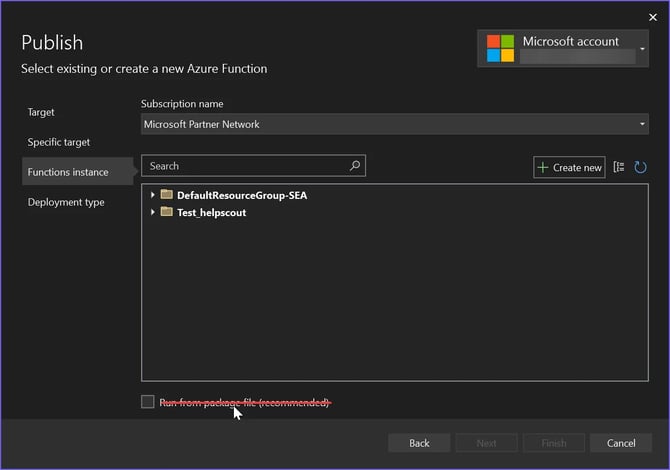
- Depending on how your deployment pipeline is set up, this setting may be applied from several different places. Track down where it's defined and where it might be overwritten.
- To apply the change, you must redeploy — the setting alone has no effect until then.