Overview
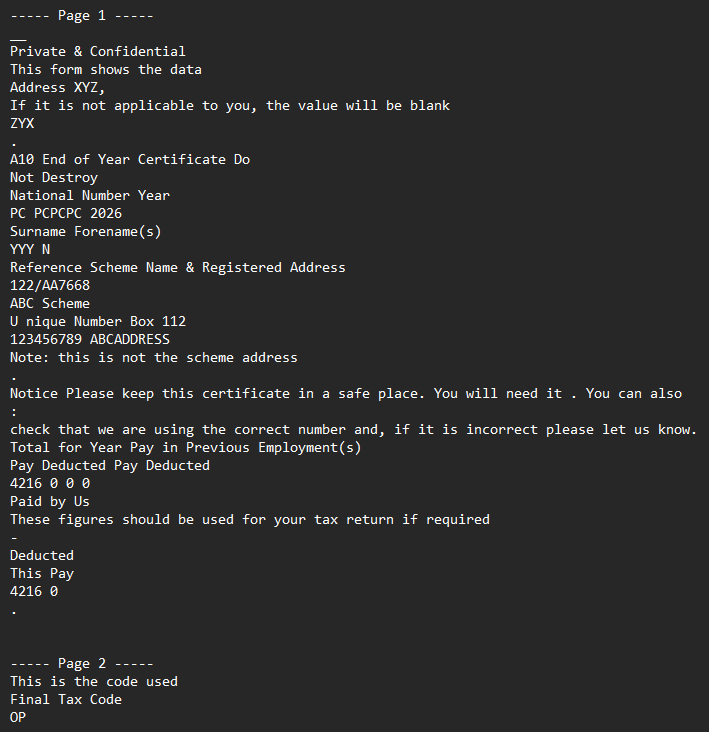
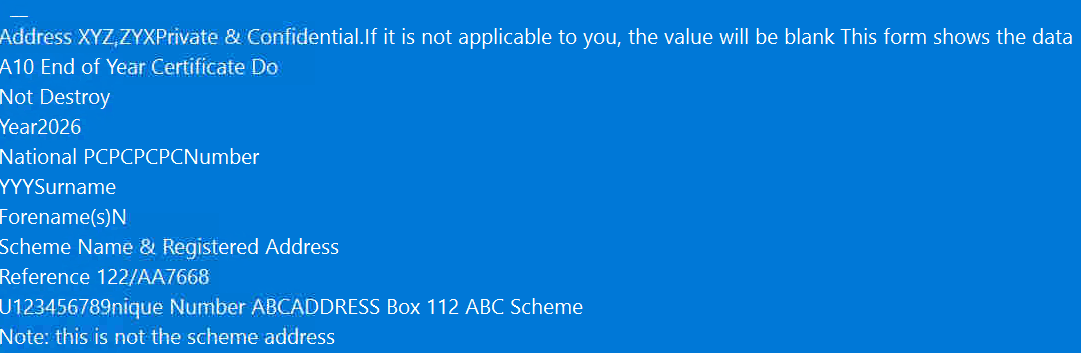
IronPDF's page.Lines groups characters into logical lines using a built-in vertical tolerance. In tightly packed table or form layouts — where two visually separate rows sit only a point or two apart — the grouper collapses both rows into one line and then sorts them by horizontal position, interleaving the characters. The result is scrambled output such as "Unique Number 123456789" extracted as "U123456789nique Number"; the fix is to extract with page.TextChunks and group rows using a tighter, tunable tolerance.
Environment
-
OS: Windows
-
Affected Versions: IronPDF 2026.5.2
-
Language/Runtime: .NET Core
Cause
This is a known limitation in IronPDF's per-page text extraction for tightly packed form and table layouts, not a version regression. Two distinct mechanisms produce the scrambled output:
page.Linesgroups characters into lines with a built-in vertical tolerance that is not configurable through the public API. When two visible rows in a table cell sit only a point or two apart, they are merged into one logical line and sorted left-to-right, producing interleaved text.page.ExtractTextFromPage(i)defaults to logical (content-stream) order. For form PDFs whose content stream does not visit cells in visual top-to-bottom, left-to-right order, the text comes out in author order rather than reading order.
Solution
- Recommended — extract with
page.TextChunksand group rows by a tunable tolerance. Each chunk carries its ownBoundingBox, so you can bucket chunks byBoundingBox.Topand then sort within each row byBoundingBox.Left. This gives you control over how aggressively rows merge and avoids the collapsed-row problem entirely.using IronPdf.Pages;
using System.Text;
static string ExtractTextUsingTextChunks(IPdfPage page, double rowTolerance = 2.0)
{
var rows = page.TextChunks
.Where(c => !string.IsNullOrWhiteSpace(c.Contents))
.GroupBy(c => Math.Round(c.BoundingBox.Top / rowTolerance) * rowTolerance)
.OrderByDescending(g => g.Key);
var extractedText = new StringBuilder();
foreach (var row in rows)
{
var line = string.Join(" ",
row.OrderBy(c => c.BoundingBox.Left)
.Select(c => c.Contents.Trim())
.Where(text => !string.IsNullOrWhiteSpace(text)));
extractedText.AppendLine(line);
}
return extractedText.ToString();
}Start with
rowTolerance = 2.0. If rows are still merging, lower it to1.0or0.5. For finer control, usepage.Charactersin place ofpage.TextChunks. -
Alternative — try visual-order extraction. For files where logical order is the only thing wrong, re-ordering by visual position may be good enough:
pdf.ExtractTextFromPage(i, TextExtractionOrder.VisualOrder);For files where rows are visually very close together, the
TextChunksapproach in step 1 is more robust.
Before
After