


Environment
- Product: IronWord
- Version observed: 2026.2.1
- App type: .NET 8 Console Application
- OS: Windows 11 Enterprise x64 (24H2)
Symptoms
- Placeholders are found during traversal, but output changes may not appear as expected.
- The template’s header (e.g., “City Attorney Cover Sheet”) is visible in the original DOCX but missing in the generated file after calling
SaveAs().
Solution (Workaround)
- Load the DOCX template using
WordDocument. - Apply placeholder replacements (recommended: use
doc.Textsreplacements for template merging). - Save the output using
doc.Save(outputPath)instead ofdoc.SaveAs(outputPath).
Example Code (C#)
using IronWord;
using System.Collections.Generic;

var templatePath = @"C:\Templates\CityAttorneyCoverSheetTemplate.docx";
var outputPath   = @"C:\Output\merged.docx";

var doc = new WordDocument(templatePath);

// Replace placeholders (recommended template approach)
var replacements = new Dictionary<string, string>
{
    ["{CaseNumber}"] = "2026-CR-12345",
    ["{DefendantName}"] = "John Doe",
    ["{DefendantAge}"] = "34",
    ["{DefendantAttorney}"] = "Jane Smith",
};

foreach (var kv in replacements)
{
    doc.Texts.ForEach(t => t.Replace(kv.Key, kv.Value));
}

// Workaround: Save() preserves the header where SaveAs() may not
doc.Save(outputPath);
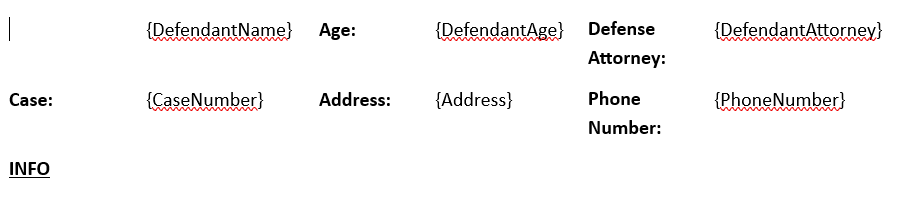
Before
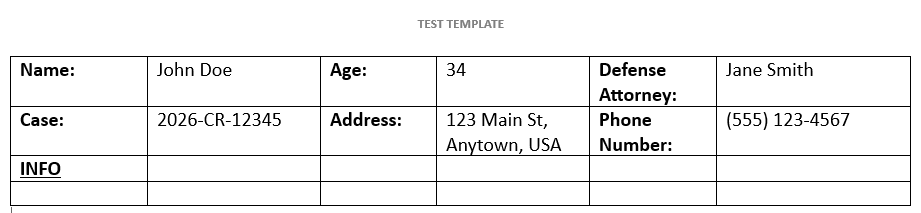
After
Notes
- If your workflow requires
SaveAs(), confirm whether the header is preserved on the latest IronWord version in your environment. - If the issue reappears, a short-term mitigation is to pin to a previously working version while the behavior is investigated.